

If you have been shopping for a budget VPS and stumbled upon Contabo, you have probably done a double-take at the prices. Four vCPUs, 8 GB RAM, and 75 GB NVMe storage for under $4 a month — it reads like a misprint. But Contabo is real, it has been around since 2003, and it genuinely delivers those specs at that price.
This Contabo review covers exactly what you get for your money: the actual performance numbers from benchmark tests, what the control panel looks like, how the support team handles requests, OpenClaw hosting, security features, domain registration, and where the service falls short. Whether you are a developer spinning up a side project, a small agency managing client sites, or someone hunting for cheap dedicated resources, this review gives you a clear picture before you commit.
I have pulled data from hands-on testing and multiple independent audits to give you an honest take — not just the marketing copy from Contabo's own website.
Contabo at a Glance
| Detail | Info |
|---|---|
| Founded | 2003 |
| Headquarters | Munich, Germany |
| Data Center Regions | 9 (EU, UK, US NYC/Seattle/St. Louis, Singapore, Japan, Australia, India) |
| Entry VPS Price | $3.96/month (12-month term) |
| Entry VPS Specs | 4 vCPUs, 8 GB RAM, 75 GB NVMe |
| Uptime SLA | 99.99% |
| Network Port | 200 Mbit/s–1 Gbit/s (plan-dependent) |
| Traffic | Unlimited incoming |
| Money-Back Guarantee | 14 days |
| Support Channels | Ticket + live chat (no phone) |
| Managed Hosting | No (unmanaged only) |
| Free SSL | No (use Let's Encrypt) |
| Built-in Firewall | No (configure at OS level) |
| DDoS Protection | Included on all plans |
| Windows VPS | Available from $13.26/month |
| OpenClaw (AI Hosting) | Available as 1-click add-on |
Bottom Line Upfront
Contabo offers some of the cheapest VPS plans on the market, and the raw specs per dollar are hard to beat. Entry-level plans start at $3.96/month and come with generous RAM and storage allocations compared to what rivals charge at the same price.
The trade-off is real, though. Benchmark results for CPU, disk IOPS, and network throughput consistently land near the bottom when compared to providers like Hetzner, DigitalOcean, or Hostinger. Support is ticket-based with no phone line. And the dual-dashboard setup (a legacy panel plus a newer beta interface) creates friction for routine management tasks.
Choose Contabo if: You need maximum resources per dollar and can tolerate moderate performance for non-critical workloads — staging servers, personal projects, game servers, or bulk storage.
Avoid Contabo if: You are running production applications where CPU speed, low latency, or fast storage IOPS are priorities.

What is Contabo?
Contabo is a German web hosting company founded in Munich in 2003. It started as a small local hosting provider and has grown into an internationally recognised budget hosting brand, serving hundreds of thousands of customers across Europe, North America, and Asia.
The company's positioning is straightforward: offer more raw server resources at lower prices than the competition. They achieve this through a unified hardware platform across all data centers, which lets them negotiate bulk hardware discounts and keep maintenance costs predictable.
Contabo's core product lineup includes Cloud VPS (virtual private servers), Cloud VDS (virtual dedicated servers with dedicated CPU cores), dedicated servers, shared hosting, and object storage. The VPS line is the most popular product and the one most people are evaluating when they search for a Contabo review.
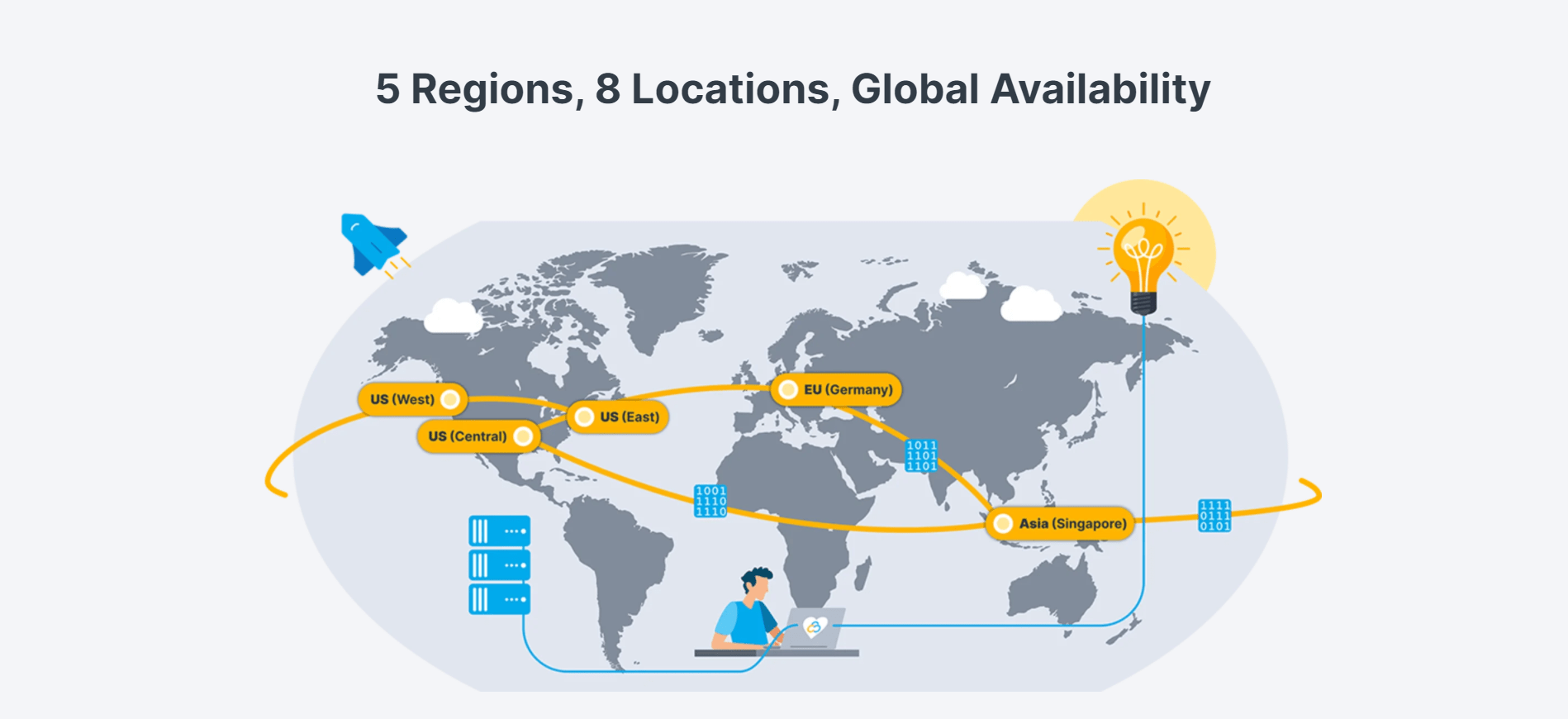
The company operates data centers across nine regions: Europe (EU), the UK, the United States (New York City, Seattle, St. Louis), Singapore, Japan, Australia, and India. That is a wider geographic spread than many budget providers offer.
Contabo OpenClaw Hosting
OpenClaw (formerly known as Clawdbot/Moltbot) is Contabo's packaged solution for running a self-hosted AI assistant on your VPS. Rather than depending on a SaaS product where your data lives on someone else's infrastructure, OpenClaw lets you deploy an AI agent directly on a Contabo server with a 1-click installer.
OpenClaw connects to messaging platforms you already use — WhatsApp, Telegram, Discord, and Slack — and gives you an AI assistant that can browse the web, manage files, run commands, and schedule tasks autonomously. The project is fully open-source with an active developer community on GitHub. You choose which AI models power it: Claude, GPT, or local models. Your data stays on your server.
OpenClaw Plan Options
| Plan | Target | vCPUs | RAM | Storage | Price |
|---|---|---|---|---|---|
| Cloud VPS 10 + OpenClaw | Personal Use | 4 | 8 GB | 75 GB NVMe | From $3.96/month |
| Cloud VPS 20 + OpenClaw | Power User | 6 | 12 GB | 100 GB NVMe | From $6.36/month |
| Cloud VPS 40 + OpenClaw | Team Deployment | 12 | 48 GB | 250 GB NVMe | From $20.80/month |
| Cloud VPS 60 + OpenClaw | Enterprise Scale | 16 | 64 GB | 500 GB NVMe | From $47.20/month |
What OpenClaw Can Do
- Automate daily tasks — set reminders, schedule messages, manage calendars via chat commands
- Developer workflows — execute code, manage GitHub repos, run scripts, integrate with CI/CD pipelines
- Research and data gathering — browse the web, extract content, compile reports in the background
- Smart integrations — connect Slack, cloud storage, smart devices, Spotify, and 50+ other tools
If you are interested in deploying OpenClaw on Contabo, we have a step-by-step guide: Install OpenClaw on Contabo VPS.
Contabo Hosting Plans & Pricing
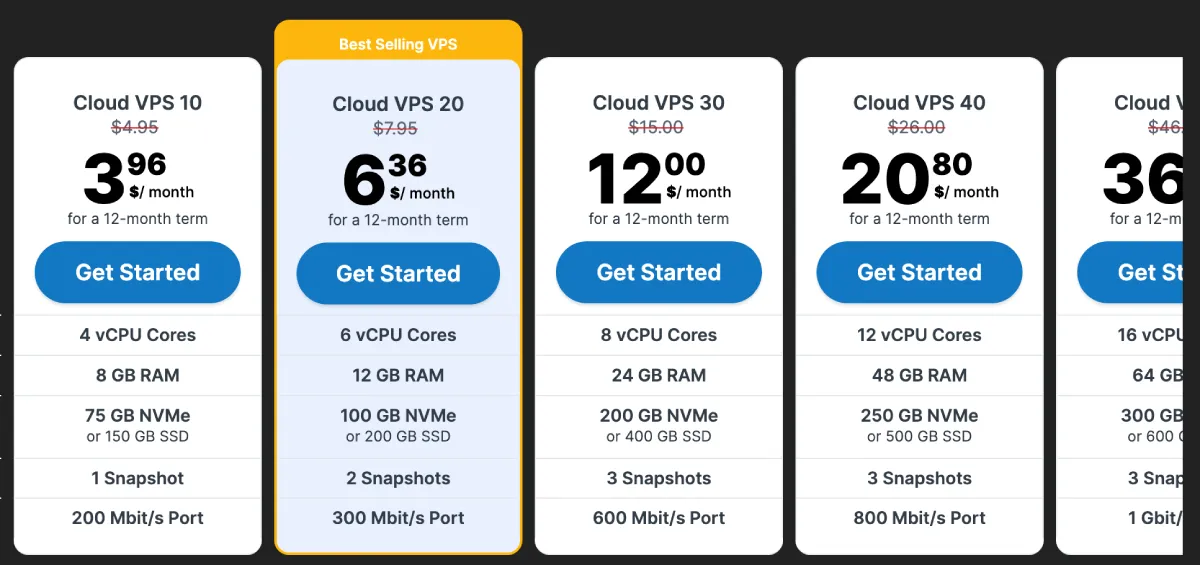
Contabo's pricing is its strongest selling point. Here is a breakdown of what the main product lines cost:
Cloud VPS Plans
All VPS plans are available with either NVMe or standard SSD storage. NVMe versions come with roughly half the storage capacity but faster read/write speeds. Port speeds scale with the plan — the entry Cloud VPS 10 gets a 200 Mbit/s port, while Cloud VPS 50 and above get a full 1 Gbit/s port.
| Plan | vCPUs | RAM | NVMe Storage | Port | Starting Price |
|---|---|---|---|---|---|
| Cloud VPS 10 | 4 | 8 GB | 75 GB | 200 Mbit/s | $3.96/month |
| Cloud VPS 20 | 6 | 12 GB | 100 GB | 300 Mbit/s | $6.36/month |
| Cloud VPS 30 | 8 | 24 GB | 200 GB | 600 Mbit/s | $12.00/month |
| Cloud VPS 40 | 12 | 48 GB | 250 GB | 800 Mbit/s | $20.80/month |
| Cloud VPS 50 | 16 | 64 GB | 300 GB | 1 Gbit/s | $36.80/month |
| Cloud VPS 60 | 18 | 96 GB | 350 GB | 1 Gbit/s | $47.20/month |
Storage VPS plans start at the same price but come with double the storage (150 GB on the entry plan) and fewer vCPUs. These are designed for applications that prioritise storage capacity over compute power — media servers, backup nodes, and similar workloads.
Cloud VDS Plans
VDS plans give you dedicated CPU cores rather than shared vCPU allocations, which results in more consistent performance:
| Plan | Dedicated Cores | RAM | Storage | Price |
|---|---|---|---|---|
| Cloud VDS S | 3 | 24 GB | 180 GB NVMe | $46.40/month |
| Cloud VDS M | 4 | 32 GB | 240 GB NVMe | $55.20/month |
| Cloud VDS L | 6 | 48 GB | 360 GB NVMe | $83.20/month |
| Cloud VDS XL | 8 | 64 GB | 480 GB NVMe | $110.40/month |
Dedicated Servers
Contabo dedicated server plans start at $86.40/month. Entry-level hardware is built on AMD Ryzen processors (12 cores, 64 GB RAM, 1 TB NVMe). Higher-tier options include AMD EPYC Genoa and Turin processors with up to 64 cores, 1152 GB RAM, and 10 Gbit/s port options. All dedicated plans include unlimited traffic with a 1 Gbit/s port as standard.
Object Storage
Object storage starts at $2.49/month for 250 GB and scales in 250 GB increments. Versioning and object locking are available, and there is an optional auto-scaling feature.
Money-Back Policy
Contabo offers a 14-day money-back guarantee. You need to notify them within 14 days of purchase. Note that additional fees (such as setup fees or location surcharges) are not refunded.
Windows VPS is also available, starting from $13.26/month, with licensing costs added on top of the base plan price.
How to Buy a VPS from Contabo
The ordering process is straightforward but has a few steps worth knowing in advance.
Step 1 — Choose Your Plan
Go to contabo.com and navigate to Cloud VPS. Pick the plan that fits your resource needs. For most new users, the Cloud VPS 10 (4 vCPU, 8 GB RAM, 75 GB NVMe) at $3.96/month is the starting point. If you need consistent CPU performance rather than shared vCPUs, consider a VDS plan instead.
Step 2 — Select Your Region
After picking a plan, you choose a data center location. The EU location (Germany/France) is included in the base price. US locations (New York, Seattle, St. Louis), Singapore, India, Japan, and Australia each carry a small additional monthly fee — typically $1–$4/month depending on the region.
Step 3 — Choose Storage Type
You can pick NVMe (faster, smaller capacity) or SSD (standard, double the storage). For most workloads — web servers, databases, application hosting — NVMe is the better choice. For backup storage or media archiving, SSD gives you more space per dollar.
Step 4 — Pick an Operating System or Image
Contabo offers a range of pre-configured operating system images:
- Linux distros: Ubuntu, Debian, AlmaLinux, Rocky Linux, CentOS, Arch Linux, FreeBSD, openSUSE
- Application images: LAMP stack, Docker, Webmin
- Control panels: cPanel, Plesk (both at extra cost)
- Specialty: Blockchain node images for Bitcoin and Ethereum
Select the image that matches your intended stack. If you are unsure, Ubuntu 22.04 LTS is the safest default.
Step 5 — Configure Add-ons
At checkout you can add:
- Auto Backup — daily backups with up to 10 restore points (paid add-on)
- Additional storage volumes — expandable block storage
- Extra snapshots — beyond what is included in your plan tier
- OpenClaw — 1-click AI agent setup on your VPS
Step 6 — Create an Account and Pay
Register with an email address and password. Payment is processed before provisioning. Contabo accepts PayPal, credit/debit cards, and bank transfer. Note: provisioning can take up to 3 hours, and you will not receive a real-time notification when the server is ready — you need to check the dashboard manually.
Once provisioned, your login credentials (including root password and VNC access details) arrive by email. Change your root password immediately after first login.
Contabo Features
NVMe SSD Storage
All Cloud VPS plans offer a choice between NVMe and standard SSD storage. The NVMe option provides significantly faster read/write speeds compared to traditional SSDs, though the available storage capacity is roughly half. If your application is I/O-intensive — databases, heavily-trafficked websites, or applications with frequent disk operations — choosing NVMe is the right call.
That said, independent benchmarks show Contabo's disk IOPS at around 21,400 for a 4K block size, which is considerably lower than competitors like Hostinger (120,300 IOPS) or DigitalOcean (115,800 IOPS). The NVMe label does not automatically mean top-tier performance compared to what premium providers deliver.
Data Center Locations

Contabo operates in nine regions: the EU (Germany/France), UK, United States (NYC, Seattle, St. Louis), Singapore, Japan, Australia, and India. This coverage is genuinely broad for a budget provider. The EU location is included in the base price; US, Asian, and Australian locations carry a small additional monthly fee.
The ability to pick a data center close to your end users matters for latency-sensitive applications. Response time tests show excellent performance for geographically close connections — a US-based server recorded response times as low as 36ms from Dallas — while more distant locations like Hong Kong came in at 384ms, which is expected given the physical distance.
Full Root Access
Every Contabo VPS and VDS plan comes with full root access. You can install any compatible software, configure the operating system as you see fit, and run any workloads that the server can handle. This is the standard expectation for unmanaged VPS hosting, and Contabo delivers it cleanly.
Available operating systems include Ubuntu, Debian, AlmaLinux, Rocky Linux, CentOS, Arch Linux, FreeBSD, and openSUSE. Pre-configured application images are also available for stacks like LAMP, Docker, Webmin, Plesk, and cPanel — the latter two at extra cost. Blockchain node images for Bitcoin and Ethereum are also available, which is unusual for a budget provider.
Snapshots and Backups
Snapshots are included in all VPS plans at no additional cost, with a limit of one to three snapshot versions depending on your plan tier. Snapshots capture the full state of your VPS at a point in time and can be restored quickly through the control panel.
Automatic daily backups are available as a paid add-on. When enabled, Contabo stores up to ten backup versions and handles the process automatically without manual configuration. The cost is charged separately on top of your base plan price. Compared to providers like OVH or Hostinger (which include free backups), this is a notable gap — you will need to budget for backup costs if data protection matters to your workload.
Control Panel Options
Contabo provides two interfaces: a redesigned Customer Control Panel (in beta since early 2026) and a legacy dashboard. The new panel looks clean and modern, with a streamlined sidebar navigation, fast loading times, and easy access to key settings. Language options include English, German, Spanish, and Portuguese.
The limitation is that not all features have been migrated yet. Tasks like plan upgrades and location changes are still handled in the legacy panel. This dual-panel workflow is frustrating — you often discover which panel handles a specific task through trial and error rather than a clear guide.
Contabo does not offer an integrated web console. Unlike most competitors, you cannot control your server directly through the browser. Instead, Contabo provides VNC credentials and points you to third-party clients like UltraVNC. An SSH connection works fine, but the lack of a browser-based console is inconvenient when you are locked out or troubleshooting.
Contabo Security
Security on Contabo is functional but largely manual. Unlike managed providers that handle security layers for you, Contabo's unmanaged VPS means you are responsible for most of it. Here is what is provided versus what you need to configure yourself.
DDoS Protection
DDoS protection is included in all Contabo plans by default with no extra configuration needed. When your server is ordered, DDoS filtering is already active. Contabo does not publish detailed specifications about filter capacity or mitigation thresholds, but the protection covers basic volumetric attacks.
For comparison, providers like Hostinger include Wanguard DDoS filtering plus an application-level firewall in their base plans. Contabo's DDoS protection handles large-scale volumetric floods reasonably well, but it lacks the application-layer filtering that would catch more sophisticated attacks.
Firewall
Contabo does not include a built-in network-level firewall accessible through the control panel. If you need firewall protection — and you do — you need to configure it at the OS level yourself. Common options:
- UFW (Uncomplicated Firewall) — easy to set up on Ubuntu/Debian
- iptables — more granular control, steeper learning curve
- Cloudflare — for web traffic filtering, works on top of your existing server setup
This is a meaningful gap compared to providers like DigitalOcean, Hetzner, and Vultr, all of which offer a cloud firewall configurable directly from the dashboard.
Two-Factor Authentication (2FA)
Contabo's Customer Control Panel supports two-factor authentication via authenticator apps (TOTP). You should enable this immediately after account creation. Contabo allows you to add trusted devices and configure 2FA recovery codes from the security settings in the panel.
Data Center Physical Security
Contabo's data centers are ISO 27001 certified. Physical security measures include biometric access controls, 24/7 video surveillance, man-traps (mantrap entry systems), and strict access logging for data center staff. This is industry-standard enterprise physical security — your hardware is in a well-secured facility.
VNC Credentials in Plain Text
One notable security concern: after a VPS is provisioned, Contabo sends VNC credentials via plain-text email roughly 48 hours later. VNC access allows full console control of your server. This is a security anti-pattern. You should change your root password and disable default VNC access as part of your first-login hardening routine.
Recommended Security Steps After Setup
- Change the root password immediately
- Create a non-root sudo user
- Disable root SSH login in
/etc/ssh/sshd_config - Set up UFW and allow only necessary ports
- Enable 2FA on your Contabo account
- Set up SSH key-based authentication
Contabo Network & Bandwidth
Network bandwidth is one of Contabo's clearest weaknesses in benchmark comparisons, but the picture is more nuanced when you look at the actual specifications they provide.
Port Speeds by Plan
Contabo uses plan-based port allocation rather than a flat bandwidth cap across all tiers. Here is what each plan provides:
| Plan | Port Speed |
|---|---|
| Cloud VPS 10 | 200 Mbit/s |
| Cloud VPS 20 | 300 Mbit/s |
| Cloud VPS 30 | 600 Mbit/s |
| Cloud VPS 40 | 800 Mbit/s |
| Cloud VPS 50 | 1 Gbit/s |
| Cloud VPS 60 | 1 Gbit/s |
All plans include unlimited incoming traffic. Outgoing traffic on VPS plans is uncapped within the port limit — there is no monthly transfer cap measured in terabytes the way some providers structure it.
IPv4 and IPv6
Each VPS comes with one dedicated IPv4 address included. Additional IPv4 addresses can be purchased as an add-on. IPv6 is supported on all plans. Contabo assigns a /64 IPv6 block per server, giving you a large range of addresses to work with for applications that support it.
Real-World Throughput vs. Benchmarks
The benchmark figure of 292 Mbit/s for network throughput is from the entry-tier Cloud VPS 10 plan, which has a 200 Mbit/s port cap. Higher-tier plans performing at their 600 Mbit/s or 1 Gbit/s ports would benchmark differently. For the entry plan, 292 Mbit/s effective throughput is close to the port ceiling — so the bottleneck is port speed, not infrastructure congestion.
If network throughput is a priority for your workload — media streaming, large file transfers, high-traffic APIs — step up to Cloud VPS 30 (600 Mbit/s port) or higher.
Domain Registration on Contabo
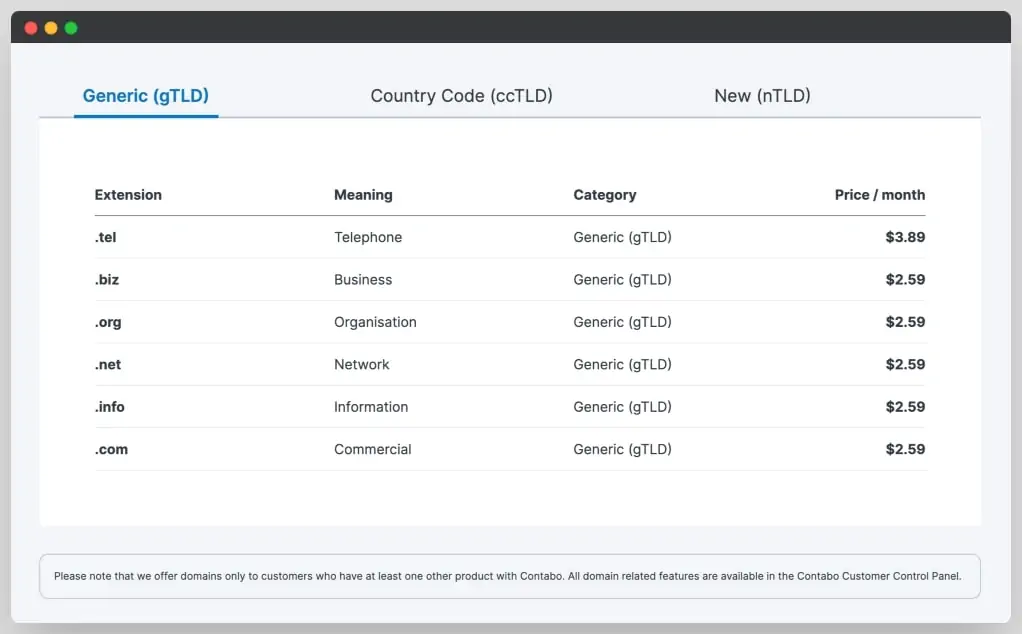
Contabo offers domain registration directly through its platform, so you can manage both your server and your domain from the same account. Domain search and registration are available from the Customer Control Panel under the Domains section.
What Is Available
- .com, .net, .org, .de, .co.uk, and a range of other TLDs
- DNS management through Contabo's nameservers, or you can use external DNS providers
- Domain transfer support if you already own a domain with another registrar
- Auto-renewal options to prevent accidental expiry
Pricing
Domain pricing at Contabo is competitive for standard TLDs but not always the cheapest available. .com domains typically fall in the $10–$15/year range. If you are managing multiple domains, a dedicated domain registrar like Namecheap or Cloudflare Registrar may offer better pricing for bulk renewals.
Should You Register Domains with Contabo?
It is convenient if you want everything in one dashboard. However, best practice is to keep your domain registrar separate from your hosting provider — if you ever need to migrate hosts or if there is an account issue, having your domain on a separate registrar means you maintain full control of your DNS independently.
How to Host Unlimited Sites on Contabo

One advantage of a VPS over shared hosting is that you are not limited to a set number of websites. You can run as many sites as your server resources support. The standard setup uses a web server like Nginx or Apache with virtual hosts, or a control panel like Webmin, Virtualmin, or cPanel (paid) that manages multiple domains through a GUI.
For WordPress-specific multi-site hosting on Contabo, a LAMP stack with Nginx as a reverse proxy is a common configuration. Since all Contabo VPS plans are unmanaged, you set this up yourself — but the install OpenClaw on Hostinger VPS guide shares some relevant setup patterns if you are new to VPS configuration.
Contabo VPS Performance
Performance is where Contabo's trade-offs become most visible. The spec sheet looks generous, but benchmark results tell a more nuanced story.
Uptime
Testing over a 50-day period showed 100% uptime. Cybernews's monitoring confirmed that the VPS server was active for the full duration without interruption. Contabo advertises a 99.99% uptime SLA, and real-world testing backs this up. Reliability is genuinely good.
Response Times
Response time tests across five global locations showed results ranging from 36ms to 384ms. The fastest result — 36ms from Dallas — reflects the test server's US-based location. Even the slowest result (384ms from Hong Kong) is acceptable for a non-latency-sensitive workload, though premium providers serving from Singapore or Tokyo would perform better for Asian users.
CPU Benchmark (Geekbench 6)
This is where Contabo struggles most visibly:
| Provider | Single-Core Score | Multi-Core Score |
|---|---|---|
| Hostinger | 1,771 | 5,476 |
| Hetzner | 1,442 | 7,945 |
| DigitalOcean | 954 | 1,652 |
| Contabo | 482 | 1,978 |
A single-core score of 482 puts Contabo at the bottom of the comparison table. For applications that depend on single-threaded performance — PHP-based web applications, WordPress sites under load, many database workloads — this weakness will show up as slower response times.
Disk IOPS (4K Block Size)
| Provider | IOPS |
|---|---|
| Hostinger | 120,300 |
| DigitalOcean | 115,800 |
| Hetzner | 57,700 |
| Contabo | 21,400 |
Storage performance is similarly below the competition. Database-heavy workloads and applications doing frequent small reads/writes will feel this difference in production.
Network Throughput
| Provider | Throughput |
|---|---|
| DigitalOcean | 6,970 Mbit/s |
| Hetzner | 5,020 Mbit/s |
| Hostinger | 986 Mbit/s |
| Contabo | 292 Mbit/s |
The 292 Mbit/s figure reflects the entry Cloud VPS 10 plan's 200 Mbit/s port. Higher-tier plans with 600 Mbit/s and 1 Gbit/s ports will perform differently. Still, even at 1 Gbit/s, Contabo's infrastructure throughput lags behind DigitalOcean and Hetzner.
The honest summary: Contabo's performance is acceptable for personal projects, development environments, game servers (Minecraft works fine as tested), staging environments, and storage-heavy but not CPU-intensive workloads. It is not competitive for production web applications where speed and responsiveness matter.
Contabo Customer Support
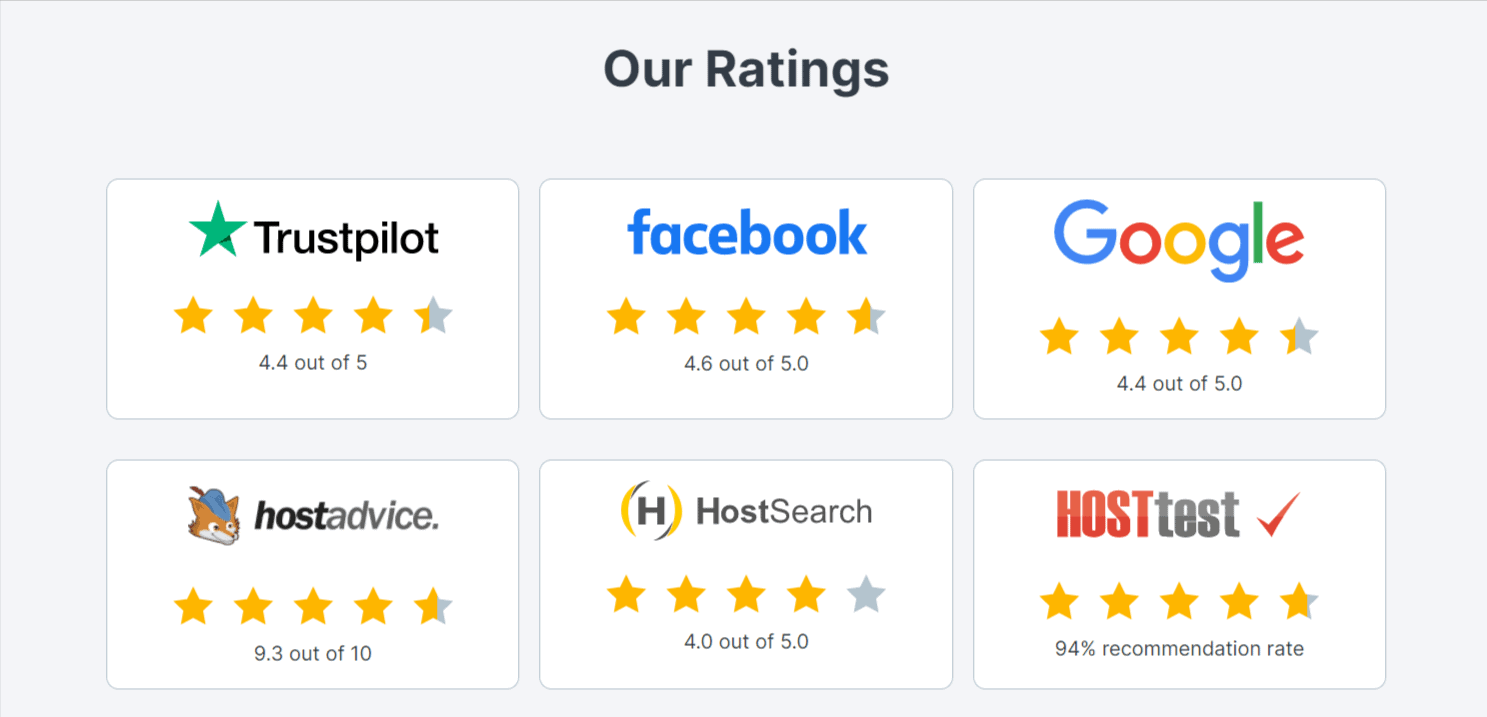
Support is one of the most commonly cited concerns in Contabo user reviews, and it is worth addressing directly.
Contabo provides support through a ticket-based system and a live chat interface. The live chat routes you through an AI chatbot first; if the bot cannot resolve your issue, you get transferred to a human agent. There is no phone support and no dedicated email line.
Support agents are available in English and German. Response quality is generally positive — when you do reach someone, they tend to be knowledgeable. The issue is availability and speed. During busy periods, the chat may not be available at all, and you fall back to submitting a support ticket with unpredictable response times.
The knowledge base covers a wide range of topics including billing, domain management, software setup, security, and service-specific guides. The quality of the articles is solid — step-by-step guides are available for common tasks — but the knowledge base is not as extensive as what you find with providers like DigitalOcean or Linode.
One important note: setup notifications are inconsistent. When a new VPS finishes provisioning (which can take up to three hours), Contabo does not immediately notify you. You may discover the server is ready only by checking the dashboard yourself. A follow-up email does arrive roughly 48 hours later — but it contains VNC credentials in plain text, which is a security concern.
For developers comfortable managing their own infrastructure, the support gaps are workable. For teams expecting hands-on assistance or near-real-time responses, Contabo will frustrate.
Payment Methods
Contabo accepts the following payment methods:
- PayPal — available globally, instant payment processing
- Credit and debit cards — Visa, Mastercard, and American Express are accepted
- Bank transfer (SEPA) — for European customers, direct bank transfers are supported
- Prepay credits — you can add funds to your Contabo account balance and billing is deducted from it
There is no Bitcoin or cryptocurrency payment option. Monthly billing is the default; paying for a 12-month term upfront gets you the discounted rates shown in the pricing tables. If you cancel within the 14-day money-back window, refunds are processed to the original payment method.
Note that some payment verification steps may be required for new accounts, particularly for larger orders, which can briefly delay provisioning.
Contabo Scalability: Upgrading Plans
Contabo does support plan upgrades, but with some important limitations to understand before you commit to an initial configuration.
Upgrading VPS Plans
You can upgrade from a lower Cloud VPS tier to a higher one through the legacy Customer Control Panel. Upgrades are handled manually — you request the upgrade, and Contabo processes it. The upgrade requires a server restart, so plan for a brief downtime window.
You cannot downgrade a VPS plan once you have upgraded. If you start on Cloud VPS 30 and want to move to Cloud VPS 10, you would need to order a new server and migrate your data manually.
Vertical vs. Horizontal Scaling
Contabo does not offer auto-scaling or load balancing through its platform. If your application outgrows a single server, you need to architect for horizontal scaling yourself — spinning up additional VPS instances manually and configuring your application to distribute load between them. For applications that need elastic scaling based on demand, a cloud-native provider like DigitalOcean or UpCloud is a better architectural fit.
Storage Upgrades
Additional block storage volumes can be attached to an existing VPS and are available as an add-on without needing to change your core plan. This makes it practical to start on an entry plan and expand storage independently as your needs grow.
Contabo Pros and Cons
Pros:
- Extremely affordable pricing — some of the lowest VPS rates available
- Generous RAM and storage allocations at every price tier
- 100% uptime in extended testing
- Wide geographic coverage (9 regions including India, Japan, Australia)
- Full root access on all plans
- Choice of NVMe or SSD storage
- DDoS protection included on all plans
- ISO 27001 certified data centers
- Pre-configured images for popular stacks (Docker, LAMP, Webmin)
- OpenClaw AI hosting with 1-click setup
- Domain registration available in-platform
- Unlimited traffic (incoming) on all plans
Cons:
- CPU, disk IOPS, and network throughput are weak compared to competitors
- No built-in firewall — requires manual OS-level setup
- No integrated browser-based web console (VNC only)
- Support has no phone line; chat may be unavailable during busy periods
- Provisioning takes up to 3 hours with no real-time notification
- VNC credentials sent via plain-text email (security concern)
- Dual-panel interface creates management friction
- Automatic backups cost extra (not included in base plans)
- No plan downgrade option after upgrading
- 14-day money-back window is shorter than the 30-day guarantees competitors offer
- Free SSL not included (use Let's Encrypt manually)
Who Should Use Contabo?
Contabo makes the most sense for a specific type of user:
Developers and hobbyists who need a low-cost server for side projects, testing environments, self-hosted applications, or learning DevOps workflows. The raw resource allocation is excellent, and the lower CPU performance is rarely a bottleneck for this use case.
Game server operators — particularly Minecraft, Valheim, or similar games — where RAM matters more than single-core benchmark scores. Contabo's 8 GB RAM on the entry plan is unusually generous.
Storage-heavy workloads where you need a large disk allocation at minimal cost: backups, media libraries, or self-hosted cloud storage with tools like Nextcloud.
Developers in India, Singapore, Japan, or Australia who need a regionally hosted server at a price point other providers cannot match in those locations.
AI and automation enthusiasts who want to self-host an AI agent like OpenClaw without paying for a third-party SaaS. The 1-click OpenClaw installer makes this accessible even for users who are not deep VPS administrators.
Avoid Contabo if you are building production e-commerce stores, running high-traffic web applications, operating databases under significant query load, or need reliable and responsive customer support as part of your SLA requirements.
For those needs, consider UpCloud — which consistently outperforms Contabo on benchmarks — or look at alternatives covered in our best cloud hosting roundup.
Contabo vs Competitors
| Feature | Contabo | Hetzner | DigitalOcean | Vultr |
|---|---|---|---|---|
| Entry VPS Price | $3.96/mo | ~$4.09/mo | $6.00/mo | $6.00/mo |
| Entry RAM | 8 GB | 2 GB | 1 GB | 1 GB |
| Entry Storage | 75 GB NVMe | 40 GB SSD | 25 GB SSD | 25 GB SSD |
| CPU Single-Core | 482 (Geekbench 6) | 1,442 | 954 | ~900 |
| Network Throughput | 292 Mbit/s | 5,020 Mbit/s | 6,970 Mbit/s | ~5,000 Mbit/s |
| Managed Option | No | No | No | No |
| Built-in Firewall | No | Yes | Yes | Yes |
| Free Backups | No (paid) | Paid | Paid | Free (weekly) |
| Data Centers | 9 regions | Europe, US | 14 regions | 32+ regions |
| Support | Ticket + chat | Ticket + chat | Ticket + community | Ticket + chat |
| AI Hosting (OpenClaw) | Yes (1-click) | No | No | No |
Takeaway: Contabo wins on raw resources per dollar for RAM and storage at the entry tier. Hetzner, DigitalOcean, and Vultr win on CPU performance, network speed, firewall features, and data center breadth. If your use case is storage-heavy and compute-light, Contabo's per-dollar value is genuine. If you need performance, the alternatives are clearly better.
Also see our MonoVM review, JetHost review, and 1GBits review for more budget VPS comparisons. Or explore our best free VPS hosting guide if you are working with a very tight budget.
FAQs
Is Contabo a legitimate hosting company?
Yes, Contabo is a legitimate and established hosting company. It was founded in Munich, Germany in 2003 and currently serves hundreds of thousands of customers worldwide. Despite its low prices, the company has a long track record and operates real infrastructure across nine global regions. It holds ISO 27001 certification for its data centers.
Why is Contabo so cheap compared to other VPS providers?
Contabo keeps prices low by running a unified hardware platform across all its data centers. This approach lets them bulk-purchase hardware at lower costs and standardise maintenance processes. The trade-off is that they use older or less cutting-edge hardware, which explains the lower benchmark scores compared to premium providers. All plans are also unmanaged, which removes the cost overhead of managed services.
Does Contabo offer managed VPS hosting?
No, Contabo does not offer managed VPS hosting. All plans are unmanaged, meaning you are responsible for the OS, software installations, security configurations, and maintenance. If you need managed hosting, providers like Kinsta or WP Engine are better alternatives for WordPress-specific needs.
Is Contabo suitable for WordPress hosting?
Contabo can run WordPress, but it is not the most practical choice for most users. Since the plans are unmanaged, you would need to configure the server yourself — installing a web server (Apache or Nginx), PHP, MySQL, and SSL certificates. For beginners, this complexity is a barrier. For developers comfortable with VPS configuration, it works fine for low-to-moderate traffic WordPress sites. For high-traffic sites, the CPU and disk IOPS performance may become a bottleneck.
What is Contabo's uptime track record?
In extended independent testing over 50 days, Contabo recorded 100% uptime. The company advertises a 99.99% uptime SLA in its terms, and real-world results have generally backed this claim. Reliability is one of Contabo's genuine strengths, despite the performance trade-offs.
Does Contabo include free SSL certificates?
No, Contabo does not include a free SSL certificate in its VPS plans. Since these are unmanaged servers, you are responsible for SSL configuration. Free options like Let's Encrypt work fine and can be set up through Certbot or Cloudflare. This is standard practice for unmanaged VPS hosting but worth noting if you are comparing against managed hosts that include SSL automatically.
What is OpenClaw on Contabo?
OpenClaw is Contabo's packaged AI hosting solution that lets you run a self-hosted AI assistant on your VPS with a 1-click installer. It connects to messaging apps like WhatsApp, Telegram, Discord, and Slack. You choose which AI model powers it (Claude, GPT, or local models), and your data stays on your own server. It is available as an add-on on any Cloud VPS plan.
Can I upgrade my Contabo VPS plan later?
Yes, you can upgrade your Cloud VPS to a higher tier through the Customer Control Panel. Upgrades require a server restart for a brief downtime window. However, plan downgrades are not supported — if you want to move to a lower tier, you would need to order a new server and migrate manually. For storage needs, you can attach additional block storage volumes without changing your plan tier.
Is Contabo Worth It in 2026?
Contabo is a good fit for a specific workload profile, and a poor fit for everything outside it.
If you want the most RAM and storage per dollar, Contabo delivers that better than almost any other provider. The entry plan's 8 GB RAM and 75 GB NVMe for under $4 a month is hard to match. Uptime is solid, the geographic coverage is broader than expected for this price point, and the setup process is reasonably clean.
But if your application demands fast CPU cycles, low-latency disk operations, or high network bandwidth, Contabo's benchmark results — bottom-tier single-core CPU scores, 21,400 IOPS disk performance, 292 Mbit/s network throughput on the entry plan — will translate into real, user-facing slowdowns.
For developers running personal projects, game servers, staging environments, bulk storage nodes, or self-hosted AI agents via OpenClaw, Contabo represents genuine value. For production web applications, e-commerce, or anything latency-sensitive, spend a few more dollars and consider UpCloud or Hetzner instead.
The bottom line: Contabo is exactly what it claims to be — a budget-first provider that maximises raw resources at minimal cost. Go in with that expectation and you will not be disappointed.