
Kinsta is an excellent managed WordPress host. It runs on Google Cloud Platform, offers container-isolated WordPress environments, and the support team genuinely knows WordPress. There's nothing to pick apart on quality.
The problem is the price. Kinsta's Starter plan costs $35/month for a single site with 25,000 monthly visits. That's hard to justify for a blog, a small business site, or a portfolio — especially when alternatives on this list offer comparable infrastructure at a fraction of the cost.
This article is for people who want the performance Kinsta promises but aren't sure they're paying a fair price — or who've already decided to move and need to know where to go next.
Here's what I'll cover:
- What actually makes Kinsta worth paying for (so you know what to look for in alternatives)
- The 10 best Kinsta alternatives in 2026, with accurate 2026 pricing
- Who each option is best suited for
- A quick-pick decision table to find your match
What Makes Kinsta Worth Its Price — And What to Look For in Alternatives
Before jumping into the list, it's worth understanding what you're paying for with Kinsta. This helps you evaluate alternatives on the right criteria instead of just comparing price tags.
- Google Cloud Platform C2 VMs — Compute-optimized instances in 37 locations worldwide
- LXD container isolation — Every site runs in its own container; one site's issues can't bleed into another
- Automatic daily backups with one-click restore — Plus on-demand backups
- Free Cloudflare CDN — Global edge caching included on all plans
- Expert WordPress-only support — Not generic support agents. People who know WordPress internals
- One-click staging environments — Available on all plans
- No CPU throttling — Unlike shared hosting that throttles you at traffic limits
When evaluating alternatives, ask: which of these do I actually need? A personal blog with 10,000 monthly visits does not need GCP C2 infrastructure and container isolation. A well-configured VPS or a quality managed WordPress plan works perfectly for most sites.
Kinsta 2026 pricing for reference:
| Plan | Price | Sites | Visits/Month | Storage |
|---|---|---|---|---|
| Starter | $35/mo | 1 | 25,000 | 10 GB |
| Pro | $70/mo | 2 | 50,000 | 20 GB |
| Business 1 | $115/mo | 5 | 100,000 | 30 GB |
At a Glance: Kinsta Alternatives Compared
| Provider | Type | Starting Price | Sites | Visit |
|---|---|---|---|---|
| Contabo | Unmanaged VPS | $7.49/mo | Unlimited | Visit |
| UpCloud | Cloud VPS | $7/mo | Unlimited | Visit |
| Hostinger | Managed WP | $2.99/mo intro | 3 | Visit |
| WP Engine | Managed WP | $20/mo | 1 | Visit |
| Cloudways | Managed Cloud | $11/mo | Unlimited | Visit |
| SiteGround | Managed WP | $2.99/mo intro | 1 | Visit |
| Nexcess | Managed WP | $21/mo | 1 | Visit |
| Pressable | Managed WP | $19/mo | 1 | Visit |
| Rocket.net | Managed WP | $30/mo | 1 | Visit |
| FastComet | Managed WP | $2.95/mo intro | 1 | Visit |
1. Contabo — Best Budget VPS for WordPress
Best for: Developers and site owners who want maximum resources at minimum cost and are comfortable with basic server management.
Contabo is a German hosting company that has built a clear reputation for one thing: giving you more server resources per dollar than almost anyone else in the industry. While Kinsta charges $35/month for a single managed WordPress site, Contabo's Cloud VPS S gives you 4 vCPU cores, 6 GB RAM, and 100 GB NVMe SSD for $7.49/month.
It's unmanaged — you handle server setup, security, and software installation. For someone comfortable with the command line, that means installing WordOps in a few commands and having a production-ready LEMP stack running in under 30 minutes. My WordPress VPS migration guide walks through the full process if you're new to this.
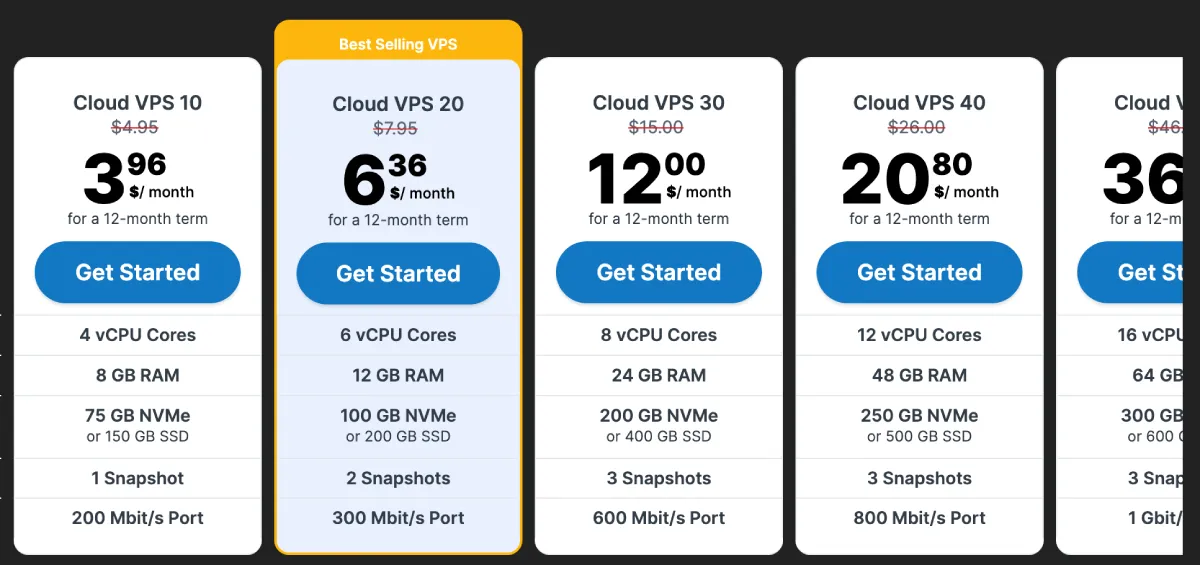
Contabo Cloud VPS Pricing (2026):
| Plan | Price | vCPU | RAM | NVMe SSD | Traffic |
|---|---|---|---|---|---|
| Cloud VPS S | $7.49/mo | 4 | 6 GB | 100 GB | 32 TB |
| Cloud VPS M | $14.49/mo | 6 | 16 GB | 200 GB | 32 TB |
| Cloud VPS L | $28.49/mo | 8 | 30 GB | 400 GB | 32 TB |
Contabo also offers managed WordPress hosting and object storage for backups. The VPS plans support data centers in Germany, the UK, the USA (Central, East, West), Singapore, Australia, and Japan.
Pros:
- Unbeatable resource-to-price ratio — 10-20x more raw compute than Kinsta for the same money
- Flat monthly billing — one VPS runs as many WordPress sites as you want
- Root access and full control over your stack
Cons:
- Unmanaged — you're responsible for setup, security hardening, and updates
- No built-in staging environment (you can set one up yourself)
- Support is generic, not WordPress-specific
2. UpCloud — Best for High-Performance Cloud Infrastructure
Best for: Developers and agencies who want GCP-level cloud infrastructure performance without the Kinsta management premium.
UpCloud is a Finnish cloud provider that has built one of the most reliable cloud platforms available. Among developers who've used it, the reputation is consistently strong — largely because of their proprietary MaxIOPS storage technology.
While most cloud providers offer standard SSDs with shared IOPS, UpCloud's storage uses pure flash with dedicated IOPS per instance. For WordPress, which is heavily I/O dependent (MySQL queries, PHP file reads, cache writes), this translates to measurably faster database operations and page generation. Independent benchmarks put MaxIOPS at up to 3x faster than standard cloud SSD storage.
UpCloud also offers a 100% uptime SLA — one of the few cloud providers that actually commits to this in writing.
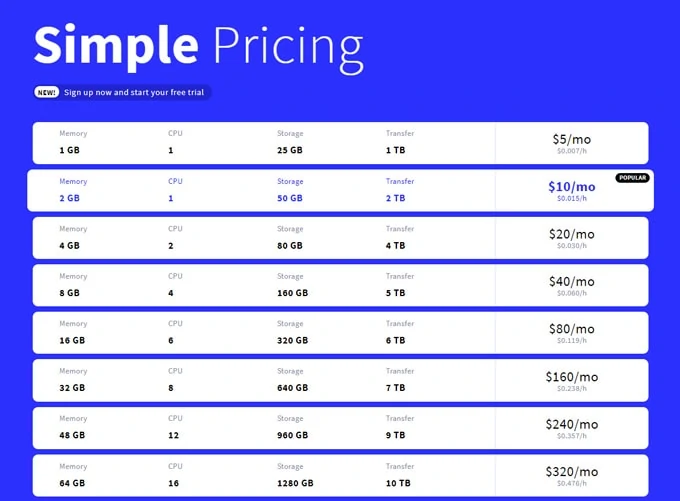
UpCloud Cloud Server Pricing (2026):
| Plan | Price | vCPU | RAM | MaxIOPS SSD |
|---|---|---|---|---|
| Simple 1xCPU-1GB | $7/mo | 1 | 1 GB | 25 GB |
| Simple 2xCPU-2GB | $14/mo | 2 | 2 GB | 50 GB |
| Simple 4xCPU-4GB | $28/mo | 4 | 4 GB | 80 GB |
UpCloud offers 30+ data center locations across Europe, North America, Asia-Pacific, and the Middle East. Hourly billing with a monthly cap makes it easy to test without commitment.
Like Contabo, UpCloud gives you a cloud server, not managed WordPress. You're responsible for setup — but the infrastructure quality is genuinely comparable to GCP. You're paying for raw performance, not a management layer.
Read my full UpCloud review for a deeper breakdown of performance benchmarks and real-world test results.
Pros:
- MaxIOPS storage delivers significantly faster WordPress I/O than standard cloud SSDs
- 100% uptime SLA — one of the strongest guarantees in cloud hosting
- Premium infrastructure at a fraction of what managed hosts charge
Cons:
- Unmanaged — requires server setup and ongoing maintenance
- No one-click WordPress installer or built-in WordPress dashboard
- Support is infrastructure-focused, not WordPress-specific
3. Hostinger — Best Affordable Managed WordPress Hosting
Best for: Bloggers, freelancers, small businesses, and beginners who want managed WordPress without touching the command line — or paying Kinsta prices.
Hostinger has transformed from a budget shared host into one of the most complete hosting platforms available. Their managed WordPress offering runs on LiteSpeed web servers with LSCache — a combination that consistently outperforms standard Apache/Nginx setups on WordPress benchmarks. LiteSpeed's native WordPress caching integration serves pages faster with less server overhead.
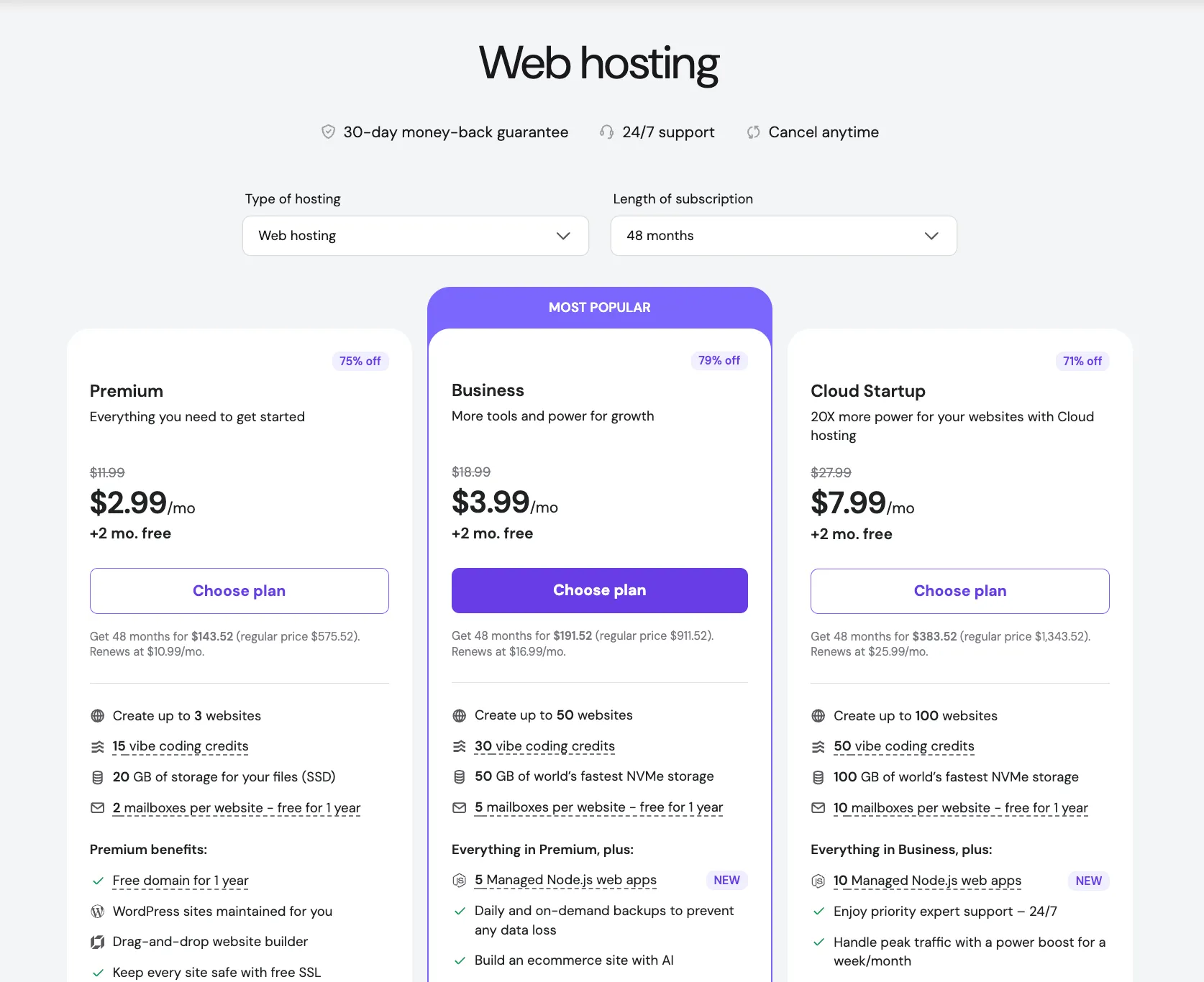
Hostinger WordPress Hosting Pricing (2026):
| Plan | Intro Price | Renewal Price | Sites | Storage |
|---|---|---|---|---|
| Premium | $2.99/mo | $10.99/mo | 3 | 20 GB SSD |
| Business | $3.99/mo | $16.99/mo | 50 | 50 GB NVMe |
| Cloud Startup | $7.99/mo | $25.99/mo | 100 | 100 GB NVMe |
Introductory pricing applies to the first billing term. Factor in renewal rates when comparing long-term costs.
Included on all Hostinger WordPress plans:
- hPanel with dedicated WordPress management section
- Free domain on eligible plans
- Free SSL with auto-renewal
- WordPress auto-updates (optional)
- Malware scanner and security monitoring
- 24/7 live chat support
- Free site migration
Business and Cloud plans also include: daily backups, staging environments, free Cloudflare CDN, and AI writing and website builder tools.
Kinsta wins on raw infrastructure quality — Google Cloud C2 vs Hostinger's servers — and on WordPress-expert support depth. But for sites under 100,000 monthly visits, the performance difference is negligible in practice, and the savings are significant.
Read my full Hostinger review for detailed performance test results and comparison against other managed hosts.
Pros:
- Genuinely managed WordPress at a fraction of Kinsta's price
- LiteSpeed + LSCache delivers strong real-world WordPress performance
- hPanel is cleaner and more beginner-friendly than cPanel
Cons:
- Introductory pricing significantly lower than renewal rates — check renewal before committing
- Support is general, not WordPress-specialist level
- Less infrastructure isolation than Kinsta's container-based setup
4. WP Engine — Closest Premium Managed WordPress Alternative
Best for: Businesses and agencies that want all of Kinsta's managed WordPress features, with WP Engine's specific ecosystem — Genesis themes, Smart Plugin Manager, and headless WordPress tooling.
WP Engine is Kinsta's most direct competitor. Both are premium managed WordPress hosts. Both run on modern cloud infrastructure. Both offer enterprise-grade staging, security, and 24/7 expert WordPress support. The choice often comes down to ecosystem preferences rather than a capability gap.
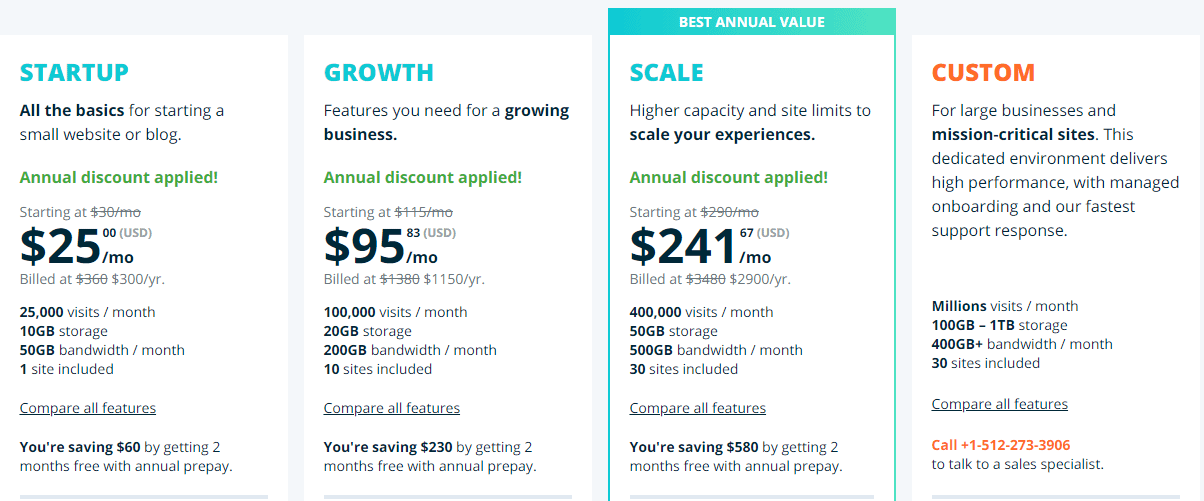
WP Engine Pricing (2026):
| Plan | Price | Sites | Storage | Visits/Month |
|---|---|---|---|---|
| Starter | $20/mo | 1 | 10 GB | 25,000 |
| Professional | $40/mo | 3 | 15 GB | 75,000 |
| Growth | $77/mo | 10 | 20 GB | 100,000 |
| Scale | $193/mo | 30 | 50 GB | 400,000 |
WP Engine regularly runs promotions — often discounting the first 3 months significantly or adding free months. Worth checking before committing at full price.
Key differentiators over Kinsta:
- Genesis Framework — Included with all plans, with premium child themes. If you build on Genesis, this offsets a significant portion of the plan cost
- Smart Plugin Manager — Automated plugin updates tested in staging before deploying live, with automatic rollback if issues are detected. Kinsta has no equivalent automated system
- Atlas (Headless WordPress) — Stronger tooling for decoupled frontends built with Next.js, Gatsby, or Nuxt
WP Engine vs Kinsta:
| Feature | WP Engine | Kinsta |
|---|---|---|
| Infrastructure | AWS/Azure (varies by region) | Google Cloud C2 |
| Starting price | $20/mo | $35/mo |
| Staging | All plans | All plans |
| Genesis themes | Included | Not included |
| Smart Plugin Manager | Yes | No |
| Headless WordPress | Strong tooling | Basic |
| Expert WP support | 24/7 | 24/7 |
Read my full WP Engine review for a detailed breakdown of performance and feature comparisons.
Pros:
- Lower entry price than Kinsta with comparable managed WordPress quality
- Smart Plugin Manager saves agencies significant time on update management
- Genesis Framework and premium themes included at no extra cost
Cons:
- EverCache can conflict with third-party caching plugins — you'll typically need to disable them
- Storage limits are tight on entry plans (10 GB on Starter)
- Visit limits apply — overage charges if you exceed the monthly cap
5. Cloudways — Best for Multi-Site Agencies
Best for: Agencies and developers managing multiple client sites who want flexible cloud provider choice with a managed layer on top.
Cloudways is a managed platform that sits on top of your chosen cloud infrastructure. You select the underlying provider (DigitalOcean, AWS, GCP, Vultr, or Linode/Akamai), Cloudways provisions the server, and you manage everything through their dashboard.
The core appeal is economics for multi-site setups: one server, unlimited WordPress applications. A $22/month DigitalOcean 2GB server through Cloudways can comfortably host 5–10 smaller WordPress sites — something Kinsta would charge $70–$115/month for.
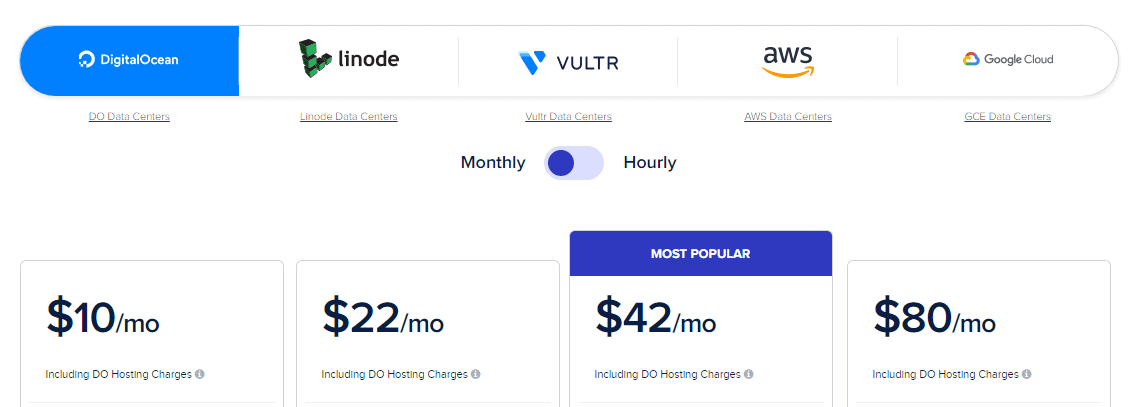
Cloudways Pricing (2026):
| Server | Price | RAM | Best For |
|---|---|---|---|
| DigitalOcean 1GB | $11/mo | 1 GB | Single small sites |
| DigitalOcean 2GB | $22/mo | 2 GB | 3–5 medium sites |
| Linode 1GB | $12/mo | 1 GB | Small sites, alternative region |
| AWS t3.small | $36/mo | 2 GB | AWS infrastructure preference |
Cloudways pricing is per-server, not per-site. The more sites you stack on one server (within resource limits), the more economical it becomes.
Key features:
- PHP 8.x, Nginx, MySQL, Redis pre-configured
- One-click SSL, staging clones, Git deployment
- Built-in Breeze cache plugin (free)
- Team collaboration and agency white-labeling
- Vertical and horizontal scaling
Also see my WP Engine vs Cloudways comparison for a detailed breakdown of when each makes more sense.
Pros:
- Flat server-based pricing — unlimited apps per server is far more economical than per-site plans
- Choice of 5 major cloud providers (DigitalOcean, AWS, GCP, Vultr, Linode)
- Team and agency collaboration features built in
Cons:
- Not truly managed — you still handle server-level decisions and scaling
- Support response times can vary; not WordPress-specialist level like Kinsta
- Pricing gets complex when scaling across multiple servers
6. SiteGround — Best for Beginners Moving Up from Shared Hosting

Best for: Bloggers and small businesses upgrading from basic shared hosting who want managed WordPress without a steep learning curve.
SiteGround rebuilt its entire platform on Google Cloud and developed its own SG Optimizer caching system with full LiteSpeed support. The result is a managed WordPress host that punches above its price class, especially for moderate-traffic sites.

SiteGround Pricing (2026):
| Plan | Intro Price | Renewal Price | Sites | Storage |
|---|---|---|---|---|
| StartUp | $2.99/mo | $17.99/mo | 1 | 10 GB |
| GrowBig | $4.99/mo | $29.99/mo | Unlimited | 20 GB |
| GoGeek | $7.99/mo | $44.99/mo | Unlimited | 40 GB |
Introductory rates apply to the first term only. Renewal pricing is substantially higher — factor this into your decision.
Included on all plans:
- Free CDN, free SSL (auto-renewal)
- Daily backups
- WordPress auto-updates
- WP-CLI access
- SG Optimizer plugin for caching and performance
GrowBig and GoGeek also include: one-click staging, on-demand backups, and priority support.
The GoGeek plan at renewal ($44.99/month) is comparable in price to Kinsta Starter ($35/month) — but includes unlimited sites, not one. For multi-site use at a similar budget, SiteGround GoGeek makes a strong case.
Pros:
- Built on Google Cloud infrastructure — same underlying platform as Kinsta
- Staging environments available from GrowBig tier up
- SG Optimizer provides strong WordPress-specific caching and performance tuning
Cons:
- Renewal pricing is significantly higher than intro rates — read the fine print
- Storage limits are low compared to competitors (10–40 GB)
- GoGeek renewal price approaches Kinsta territory without the same infrastructure isolation
7. Nexcess — Best for WooCommerce and High-Traffic Sites
Best for: WooCommerce stores, membership sites, and content-heavy WordPress installations with significant database demands or unpredictable traffic spikes.
Nexcess is LiquidWeb's managed WordPress and WooCommerce brand. LiquidWeb has been in enterprise hosting for over two decades, and Nexcess inherits that infrastructure with a specific focus on WordPress performance at scale.
Nexcess Pricing (2026):
| Plan | Price | Sites | Storage | Traffic |
|---|---|---|---|---|
| Spark | $21/mo | 1 | 15 GB | Unlimited |
| Maker | $43/mo | 5 | 40 GB | Unlimited |
| Designer | $75/mo | 10 | 60 GB | Unlimited |
The word "unlimited" in the traffic column is the key differentiator. Kinsta and WP Engine both impose visit limits and charge overages. Nexcess does not. If you run a WooCommerce store, publish content that occasionally goes viral, or run seasonal marketing campaigns with traffic spikes, unlimited traffic plans remove a meaningful source of billing anxiety.
Standout features:
- Automatic scaling during traffic spikes — temporary additional PHP workers provisioned automatically when needed, then released
- WooCommerce-optimized server configurations — specifically tuned for store performance
- Built-in image compression — automatic image optimization without a plugin
- Plugin performance monitoring — dashboard shows which plugins are slowing your site
- Visual regression testing — available for verifying updates haven't broken layouts
Pros:
- No traffic or visit limits on any plan — no surprise overage charges
- Automatic traffic spike scaling handles viral moments without manual intervention
- WooCommerce-specific tuning makes a measurable difference for store performance
Cons:
- Starting price ($21/mo) is higher than Hostinger or SiteGround for a single site
- Fewer data center locations than larger providers
- Interface is less polished than Kinsta or WP Engine dashboards
8. Pressable — Best for the WordPress.com Ecosystem
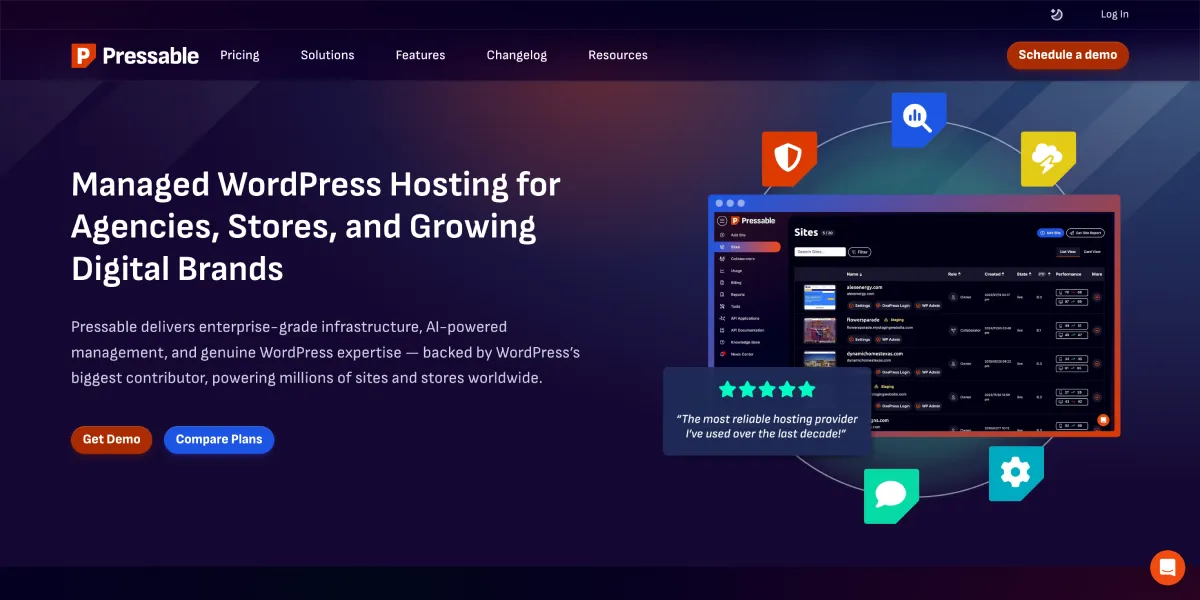
Best for: Content teams, publishers, and businesses already in the Automattic/WordPress.com ecosystem who want GCP-based managed WordPress with deep Jetpack integration.
Pressable is an Automattic company — the team behind WordPress.com, WooCommerce, and Jetpack. That ownership means deep integration with the WordPress ecosystem and a team with genuine skin in WordPress's future.
Pressable Pricing (2026):
| Plan | Price | Sites | Storage | Visits/Month |
|---|---|---|---|---|
| Personal | $19/mo | 1 | 20 GB | 60,000 |
| Starter | $45/mo | 3 | 30 GB | 150,000 |
| Pro | $95/mo | 10 | 50 GB | 400,000 |
Pressable runs on GCP — the same infrastructure as Kinsta — with automatic WordPress updates, daily backups, free CDN, free SSL, and 24/7 expert WordPress support.
The key differentiator is Jetpack integration. Enterprise Jetpack features — including VideoPress, enhanced backup options, and security scanning — are bundled at no extra cost. Kinsta charges separately for equivalent security and backup add-ons.
Pros:
- GCP infrastructure — comparable to Kinsta's underlying platform
- Jetpack Enterprise included — saves on add-on costs for security, backups, and video
- 24/7 WordPress-expert support from a team deeply embedded in the WordPress ecosystem
Cons:
- Personal plan visit limit (60K/mo) is lower than Kinsta Starter (25K) — wait, Personal is actually 60K which is more than Kinsta's 25K Starter
- Fewer available data center regions compared to Kinsta's 37 locations
- Less name recognition means fewer community resources and tutorials compared to Kinsta or WP Engine
9. Rocket.net — Best for Cloudflare Enterprise Performance
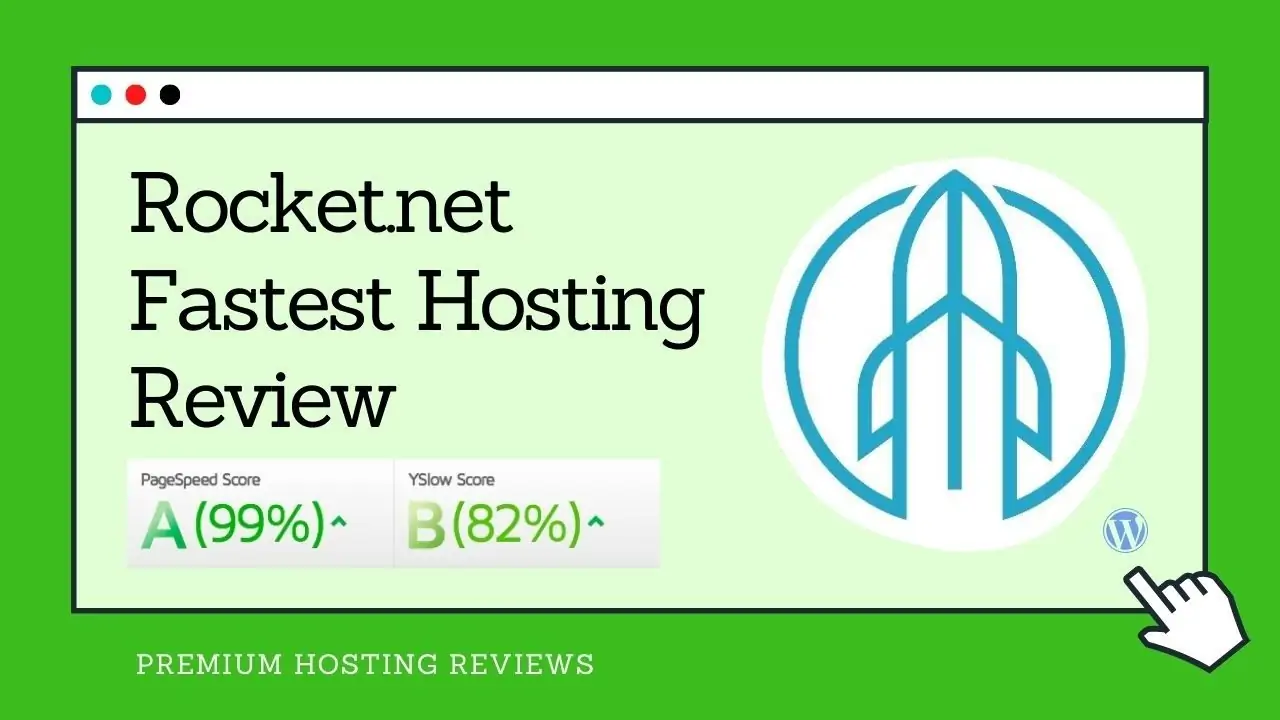
Best for: Sites where global CDN performance and edge delivery is the primary concern — particularly content-heavy sites with international audiences.
Rocket.net has built a clear niche by partnering with Cloudflare Enterprise and using its edge network as the primary performance layer. Every Rocket.net site is served from Cloudflare's 300+ edge locations with enterprise-tier caching and security — access that would cost thousands of dollars per month if purchased directly through Cloudflare.
Rocket.net Pricing (2026):
| Plan | Price | Sites | Storage | Visits/Month |
|---|---|---|---|---|
| Starter | $30/mo | 1 | 10 GB | 100,000 |
| Pro | $65/mo | 3 | 20 GB | 300,000 |
At $30/month, Rocket.net is nearly the same price as Kinsta's Starter plan. The value proposition isn't cost savings — it's a different infrastructure architecture. Kinsta delivers performance through GCP C2 origin servers. Rocket.net delivers it through Cloudflare Enterprise edge caching, which can outperform origin-based setups for geographically distributed audiences because pages are served from the closest edge node, not the origin server.
Included on all plans:
- Cloudflare Enterprise CDN with DDoS protection
- Automated daily backups
- Free SSL
- One-click staging environments
- 24/7 managed WordPress support
- Free migrations
Pros:
- Cloudflare Enterprise on all plans — genuine enterprise CDN without enterprise pricing
- 100,000 visit limit on Starter plan — more generous than Kinsta Starter's 25,000
- Strong global performance for international audiences through edge caching
Cons:
- Similar price to Kinsta Starter — not a budget option
- 10 GB storage on Starter is the same as Kinsta; tight for media-heavy sites
- Smaller platform means fewer integrations and community resources than larger providers
10. FastComet — Most Feature-Complete Budget Option
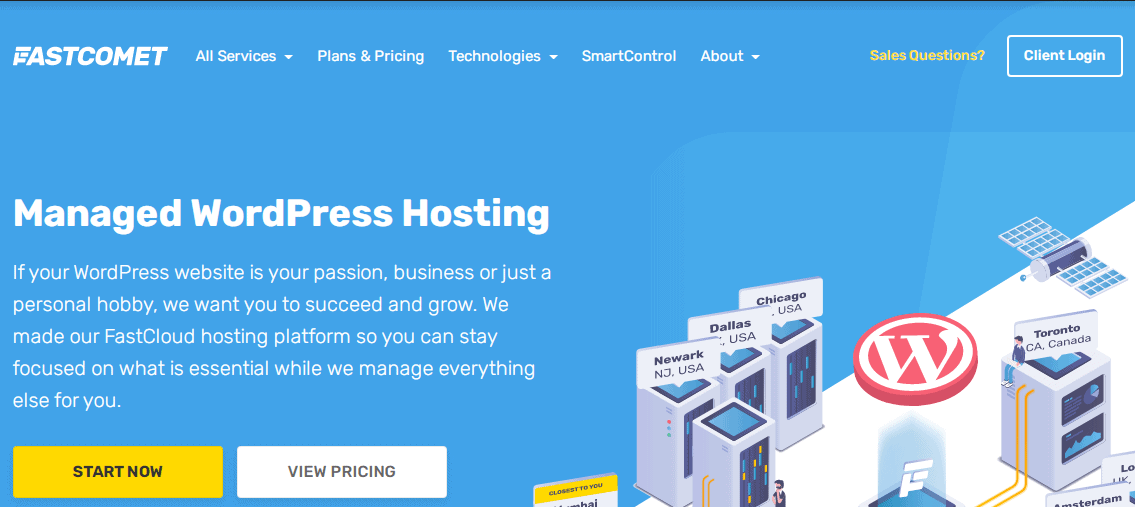
Best for: WordPress users who want a wide feature set, global data center coverage, and predictable pricing at an affordable rate.
FastComet has built a compelling managed WordPress package over the years. Their offering includes free CDN across 11 data center locations, daily and weekly backups, free SSL, cPanel access, and a 100% uptime SLA — a feature breadth that outpaces most hosts at this price point.
FastComet Pricing (2026):
| Plan | Intro Price | Sites | NVMe Storage |
|---|---|---|---|
| FastCloud | $2.95/mo | 1 | 15 GB |
| FastCloud Plus | $4.95/mo | Unlimited | 25 GB |
| FastCloud Extra | $7.95/mo | Unlimited | 35 GB |
What stands out:
- 11 data center locations spanning Asia, Europe, and the Americas — a wider geographic spread than most managed hosts at this price
- Full cPanel access — useful for developers who want direct server file and database management
- Free RocketBooster — CDN and caching combination across all plans
- Free domain transfer with lifetime domain renewal discount
- Free migrations with no limits on migration complexity
- Daily backups included across all tiers
FastComet is not as performant as the VPS options above, and the infrastructure is shared. But the combination of global data center options, cPanel access, and consistent feature availability across all plans makes it a reliable, predictable choice for budget-conscious users who want more than basic managed WordPress.
Pros:
- 11 global data centers — unusual at this price point
- Full cPanel access gives developers direct control
- Generous feature set across all tiers — no major features locked behind expensive plans
Cons:
- Shared hosting infrastructure — not isolated like Kinsta or VPS options
- Introductory pricing doesn't reflect renewal rates
- Performance ceiling is lower than cloud VPS or premium managed WordPress hosts
How to Choose the Right Kinsta Alternative
Go with Contabo or UpCloud if:
- You're comfortable managing a Linux server (or willing to learn)
- You want maximum hardware resources for minimum money
- You run multiple sites and want a single flat monthly bill
- You've followed a VPS setup guide like my WordPress VPS migration tutorial
Go with Hostinger if:
- You want fully managed WordPress with no server management
- Budget is the primary constraint
- Your site gets under 100,000 monthly visits
- You're a beginner or want hosting that works without technical involvement
Go with WP Engine if:
- You want the closest managed WordPress experience to Kinsta at a lower entry price
- You build on the Genesis Framework
- Automated plugin management saves you meaningful time
- You need premium managed hosting and want a proven alternative
Go with Cloudways if:
- You manage multiple client sites as an agency or freelancer
- Flat server-based pricing (unlimited apps per server) is more economical than per-site plans
- You want flexibility in choosing your underlying cloud provider
Go with Nexcess if:
- You run WooCommerce or a membership site
- Traffic spikes from campaigns or seasonal sales make visit-limited plans a liability
- You want automatic scaling without managing it yourself
Go with Pressable if:
- You work heavily within the Automattic/WordPress.com ecosystem
- Jetpack Enterprise features (security, video, backup) are valuable to your workflow
- You want GCP infrastructure with WordPress-expert support at a lower price than Kinsta
Go with Rocket.net if:
- Global CDN performance for international audiences is your primary concern
- Cloudflare Enterprise integration matters to your security or performance requirements
- You're comparing directly with Kinsta Starter and want more visit headroom ($30/mo for 100K visits vs $35/mo for 25K)
Go with SiteGround or FastComet if:
- You want a beginner-friendly managed WordPress experience at a low intro price
- You're upgrading from basic shared hosting and don't need Kinsta-level infrastructure
FAQs
Is Kinsta worth the price in 2026?
Kinsta justifies its price for businesses where WordPress performance directly affects revenue — e-commerce stores, high-traffic media sites, agencies managing enterprise clients. The Google Cloud C2 infrastructure, container isolation, and WordPress-expert support are genuinely premium. For blogs, small business sites, and portfolios under 50,000 monthly visits, the price is hard to justify when alternatives deliver comparable real-world performance at a fraction of the cost.
What is the cheapest Kinsta alternative?
FastComet starts at $2.95/month and Hostinger at $2.99/month — both are managed WordPress hosts with solid feature sets. If you're open to an unmanaged VPS, Contabo offers 4 vCPU cores, 6 GB RAM, and 100 GB NVMe SSD for $7.49/month, which gives you far more raw resources than Kinsta's $35/month plan, at the cost of doing your own server setup.
Can I migrate from Kinsta for free?
Most alternatives on this list offer free migration services. Hostinger, SiteGround, WP Engine, Pressable, Cloudways, and FastComet all include free migration assistance. Contabo and UpCloud are unmanaged — you'd migrate yourself or hire someone to do it. The process typically takes 1–2 hours for a standard WordPress site.
Kinsta vs WP Engine — which is better?
Both are premium managed WordPress hosts with comparable quality. Kinsta runs on Google Cloud C2 with stronger container isolation. WP Engine starts $15/month cheaper on entry plans and includes Genesis Framework and Smart Plugin Manager. If you build on Genesis or need automated plugin management, WP Engine edges ahead. For raw infrastructure performance and a slightly cleaner dashboard, Kinsta is marginally better. See my full WP Engine review for a detailed comparison.
What's the best Kinsta alternative for WooCommerce?
Nexcess is the strongest WooCommerce alternative to Kinsta. It offers WooCommerce-optimized server configurations, automatic traffic spike scaling, and unlimited traffic on all plans — no overage charges if a campaign or sale drives unexpected traffic. The Spark plan starts at $21/month for a single site with 15 GB storage and unlimited visits.
What's the best Kinsta alternative for beginners?
Hostinger is the best Kinsta alternative for beginners. It's fully managed, requires zero server management, uses LiteSpeed for strong WordPress performance, and costs a fraction of Kinsta's price. The hPanel control panel is genuinely beginner-friendly, and 24/7 live chat support is available on all plans. Start with the Business plan if you want daily backups and staging included.
Which Kinsta Alternative Should You Choose in 2026?
| Your Situation | Best Pick | Starting Price |
|---|---|---|
| 🖥️ Max resources, lowest monthly cost | Contabo | $7.49/mo |
| ☁️ Premium cloud performance, technical users | UpCloud | $7/mo |
| 🌱 Beginners, no server management | Hostinger | $2.99/mo intro |
| 🏆 Closest Kinsta rival, managed WP | WP Engine | $20/mo |
| 🏢 Agencies managing multiple client sites | Cloudways | $11/mo |
| 📈 Upgrading from shared hosting | SiteGround | $2.99/mo intro |
| 🛒 WooCommerce or unlimited traffic | Nexcess | $21/mo |
| 🔵 WordPress.com/Automattic ecosystem | Pressable | $19/mo |
| ⚡ Cloudflare Enterprise edge performance | Rocket.net | $30/mo |
| 🌍 Budget + global data centers + features | FastComet | $2.95/mo intro |
Kinsta is an excellent product — but most WordPress sites don't need everything it offers. A well-configured $7.49/month VPS will outperform a misconfigured $35/month managed plan. A properly tuned Hostinger Business plan will serve most blogs just as well as Kinsta Starter, at a fifth of the price.
Pick the right level for where you are today, not where you hope to be in three years. You can always move up.